A year ago, working with AI meant a browser tab. You uploaded files one at a time, read an answer, copied it out, and did the actual integration yourself. The thinking was rented; the work stayed manual.
Cowork changed the shape of that. It arrived as a research preview in January 2026, reached general release in April, and works inside the folders you share with it — reading, editing and creating files, running scripts, and holding scheduled jobs. It now reaches the web and mobile as well, in a beta rolling out over several weeks starting with the Max plan.
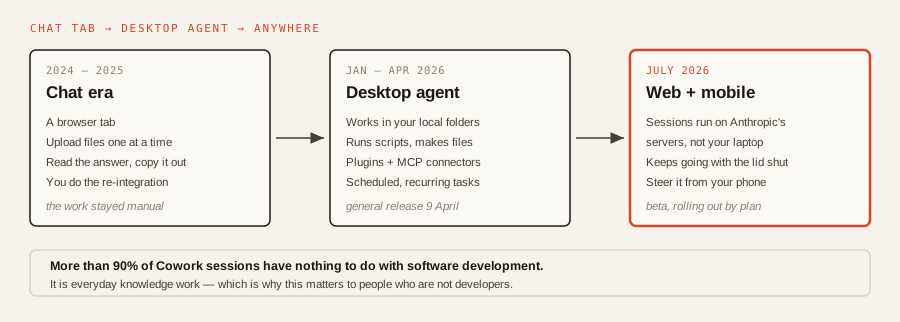
The promise is that a job can start at your desk, carry on with the laptop shut, and be checked from your phone. Two caveats worth having straight. If you have gone looking and cannot find it, that is expected — access arrives in stages by plan rather than all at once. And the desktop app remains the full Cowork experience — Anthropic calls it the place for deep work, where Claude can also use your local files and your browser. What the remote sessions add is continuity, not the whole product.
90%+of the work people do in Cowork is not software development, Anthropic says. It is everyday knowledge work — the ordinary stuff of a working week.
Chat or Cowork? One question
People lose more time choosing the wrong surface than writing bad prompts. The test: does the job touch real files, run code, or need to continue while you get on with something else?
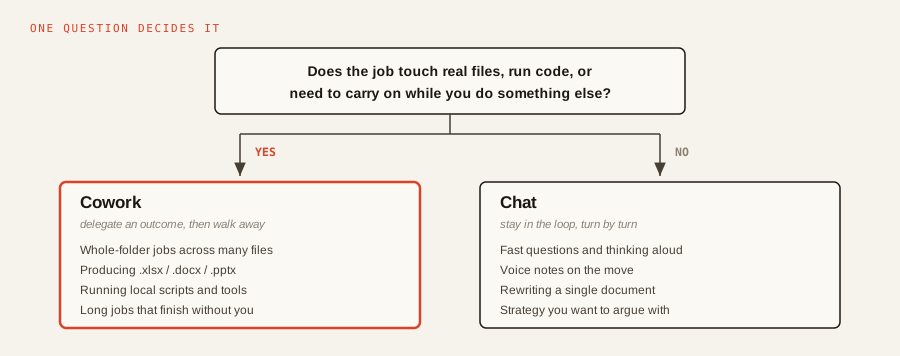
Chat is for staying in the loop turn by turn: quick answers, thinking aloud, voice notes, arguing with a strategy. Cowork is for delegating an outcome and walking away — cross-referencing a messy folder, building a spreadsheet, running a script, producing a deliverable you can send.
The two dials that matter
Most of the cost and frustration in Cowork comes from two settings people never touch: which model runs the session, and how hard it thinks before acting. The effort control sits beside the model picker in Cowork and on claude.ai, and reached all plans alongside Opus 4.8.
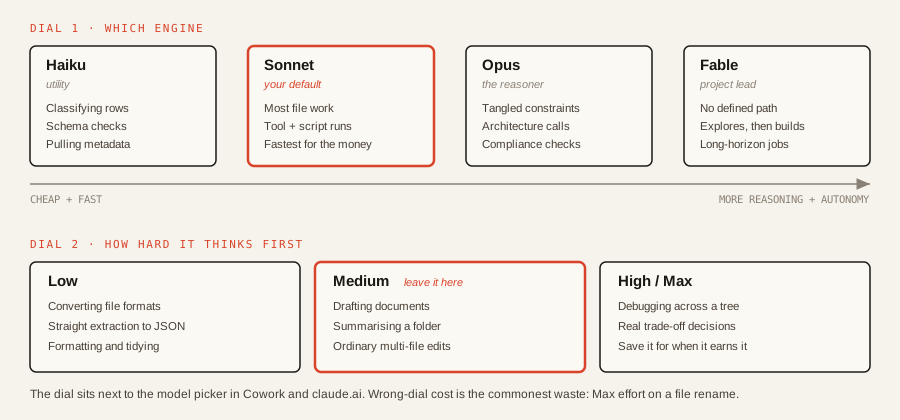
The honest defaults: Sonnet and medium effort handle the large majority of sessions. Drop to Haiku and low effort for mechanical work — classifying rows, checking a schema, renaming and converting. Reach for Opus when the problem is genuinely knotty, and Fable when there is no defined path and you want it to explore, form a view and build. Max effort on a file rename is the most common way to spend money on nothing.
Connectors: fewer, on purpose
Cowork reaches other systems through connectors built on the Model Context Protocol, the open standard Anthropic published in late 2024. The library now covers the obvious suspects — Google Drive, Gmail, Calendar, Slack, Notion, Salesforce — and you authorise them under Settings, then Connectors.
The discipline is scoping. Leaving everything switched on pollutes context and burns rate limits on tools the task never needed; enable only what the job requires. Done properly, the local-plus-remote combination is where Cowork earns its keep. A single instruction of the shape read the feedback files in ./data/reviews/, cross-reference the open bugs in Jira, and draft the product update for Slack spans your disk and two SaaS tools without you touching either.
The Markdown habit
The most common failure is context saturation — the session runs out of room because it swallowed bloated formats. A .docx or .pdf is mostly not text: it is markup, layout coordinates, style and font data, and the agent pays to read all of it.
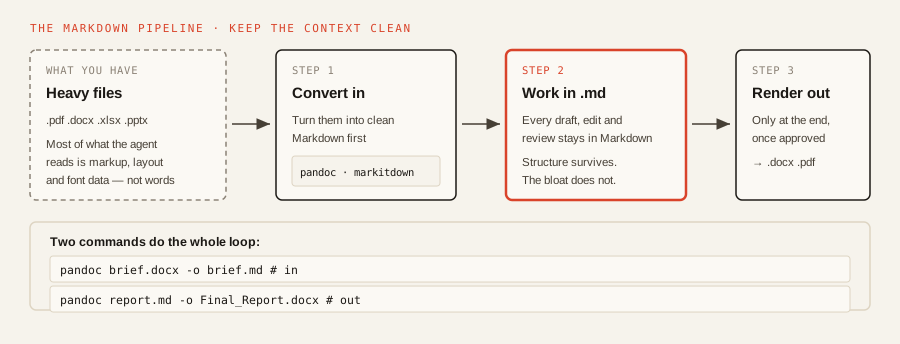
Markdown is the format models read most cheaply. It keeps the structure that matters — headings, lists, tables — and drops the overhead. So: convert your inputs first, iterate entirely in .md, and render the deliverable only once the content is approved. Pandoc does both ends in one line each, and Microsoft’s markitdown handles a wider spread of inputs.
Start here
Three things, in order:
- Put a
CLAUDE.mdin your working folder. House style, naming conventions, what it may and may not modify. It reads this automatically, so you stop repeating yourself and it stops guessing. - Convert one real project to Markdown and run it end to end — inputs in, iterate in
.md, render the final document out. This single habit does more for speed and cost than any prompt trick. - Set your defaults and leave them: Sonnet, medium effort, one connector at a time. Escalate deliberately, not by reflex.
Then give it something you would genuinely hand to a junior colleague, and close the laptop.
Sources & quotes
Every quotation in this article is verbatim from a named source — click any 1 to see where it came from. It's part of how we keep an AI-run newsroom honest. How we verify →